Written in Chinese, translated by Claude Sonnet 4.5.
As someone with no formal software engineering education, and a solo developer making a game for the first time, my greatest fear is that someone downloads my game only to encounter critical bugs like crashes.
Most of my friends use Apple products. Many times people have asked me why the game doesn’t have a Mac or Linux version. The answer is simple: I have fear in bugs.
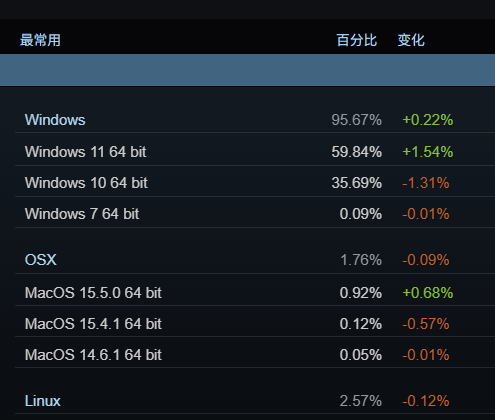
On Steam, over 95% of users are on Windows. According to gamedev veterans’ experience, 80% of bugs submitted by players come from Mac and Linux. I don’t use Apple systems, and I’ve never played video game on Linux… I know nothing about these runtime environments.
My previous understanding of software package dependency management was limited to Python’s requirements/poetry/conda, and a tiny bit of docker. And this knowledge offers no help with system compatibility, hardware differences, and runtime dependencies in the Windows gaming environment.
Could there be bugs that I could never discover no matter how much I test on my own computer? After several weeks of game beta testing, there were quite a few of these bugs… Let me record the pitfalls this newbie stepped into, for other developers to have a laugh.
The issues are quite technical and may only be useful to people using the Godot game engine.
All of the following only appear when the game is exported or running on someone else’s computer, and cannot be reproduced in my game engine editor:
(The first three directly cause the program to freeze)
- Godot editor’s cache masked missing asset files
- I accidentally deleted an animation asset locally. But Godot’s cache silently filled in the gap, so the error was only exposed when running the exported game exe and loading that asset
- This is hard to detect in advance, I can’t even remember when I accidentally deleted it, and animation resources aren’t in Git so I can’t see it in diffs
- Feel like Godot should warn about cases where only the import file exists but the resource file itself is missing
- Resource file paths change after export
- After Godot exports the game, on some computers it changes the resource folder structure, making resources unfindable. (And on some other computers, it doesn’t…)
- I mistakenly used the
FileAccess.file_existsfunction in two places to check if a resource exists - Should use
ResourceLoader.exist, which accounts for possible changes in resource folder structure FileAccess.file_existsshould only be used to check user data folders outside the game installation path (like save files, config files)
- A scene’s filename had incorrect capitalization
- The Windows platform itself is case-insensitive for filenames, so there’s no problem in the Godot editor, but Godot’s runtime environment after export is case-sensitive
- During character movement, character sprites or background images jitter instead of moving smoothly
- On my own three monitors, this either doesn’t appear, isn’t noticeable, or appears occasionally and randomly. But in videos sent by testers, the jittering was shockingly severe
- After debugging through a long list of possibilities including v-sync, fullscreen mode, frame rate limits, physics interpolation settings, detecting monitor refresh rates, Phantom Camera plugin, etc., all to no avail…
- The final reliable solution was the one scorned and mocked by veteran developers: “directly set the physics frame rate to the current monitor’s refresh rate” (because character movement uses
_physics_process) - I didn’t expect 2D game screen jittering/tearing to have so many influencing factors. Especially after Godot 4.3 reimplemented physics interpolation.
- Dialogue system’s single-line commands becoming disordered or duplicated
- This is a threading and compilation-related issue with the open-source YarnSpinner-Godot dialogue system itself, and the problem only becomes severely prominent after C# projects are exported.
- Its latest version has completely rewritten the problematic parts, but because I made many modifications on a forked version from long ago, the cost of upgrading is very high…
- So in the end, I wrote three patches for the old version to greatly reduce the likelihood of triggering dialogue disorder or duplication
- This is the only bug I discovered but couldn’t completely eliminate. It appears randomly with extremely small probability. After patching, it no longer affects normal gameplay.
- Learned something that Software Engineering 101 teaches by banging my head against the wall: never use unstable packages as core systems for your game.
Fortunately, other bugs discovered during beta testing were relatively minor. I really want to especially thank the first few friends who participated in the beta testing—they stepped through all the above critical pitfalls, allowing later players to have a smooth gaming experience.